Graded Pokémon Card Prices and PSA Population: How to Check Both
See what PSA, CGC, BGS and other graded copies of a Pokémon card sell for, and how many copies PSA has graded at each grade. Learn how to read both, and what they tell you before you buy, sell or grade.

Graded Pokémon card prices tell you what a card sells for once a company such as PSA or CGC has authenticated it, given it a grade and sealed it in a slab. A PSA population report tells you how many copies PSA has graded at each grade. You need both to understand a slab: the price shows what buyers pay, and the population shows how rare that grade really is.
The EvoScan Pokémon card scanner puts both on the card page, on your iPhone or iPad. Open a card, and you can compare what each grade sells for at each grading company, and see how many PSA copies exist at each grade. There’s no need to search through sold listings and a separate population database.
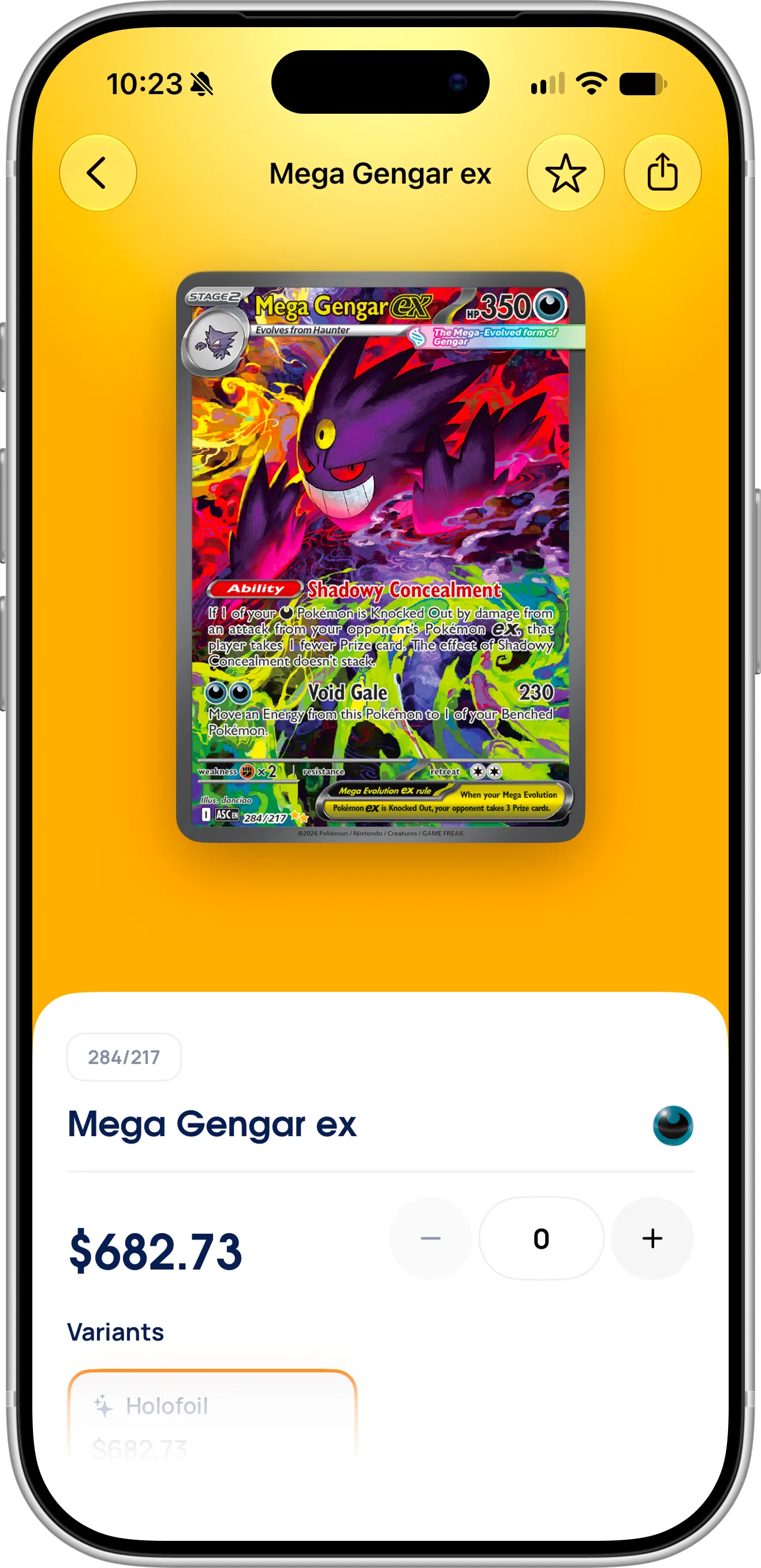
The card page starts with the raw price. Graded prices and the PSA population report are further down the same page.
What Are Graded Pokémon Card Prices?
A raw card is a card outside a slab, and its price depends on its condition, such as Near Mint. A graded card has a number from a grading company, usually from 1 to 10, and buyers pay for that exact grade from that exact company. That’s why one card can have dozens of different prices.
The grade you’ll see most often is PSA 10, known as Gem Mint, followed by PSA 9, known as Mint. Some companies go above a regular 10. CGC, for example, has a Pristine 10 for its very best copies, and it’s listed as a separate grade with its own price.
What You Need Before Getting Started
To check graded prices, download the EvoScan Pokémon card scanner from the App Store. It’s free to download and works without an account, on iPhone and iPad with iOS 18 or later. Allow camera access the first time you scan a card. If you only look cards up in search, you don’t need the camera at all. Graded prices and PSA population are currently available to all EvoScan users, so you don’t need Pro to see them.
How To Check Graded Pokémon Card Prices
Follow these steps to see the graded prices of a card:
- Find the card. Search by name or printed number from the dashboard, or open it from My Collection, a set or Scan History. If you have the card with you, scan it first, then open it from Scan History.
- On the card page, select your variant if the card has several, then scroll down to Graded prices.
- Tap a grading company, such as PSA, CGC, BGS, TAG, ACE or AGS. Swipe the row to see any others.
- Read the list: each grade has its own row, from the highest grade down.
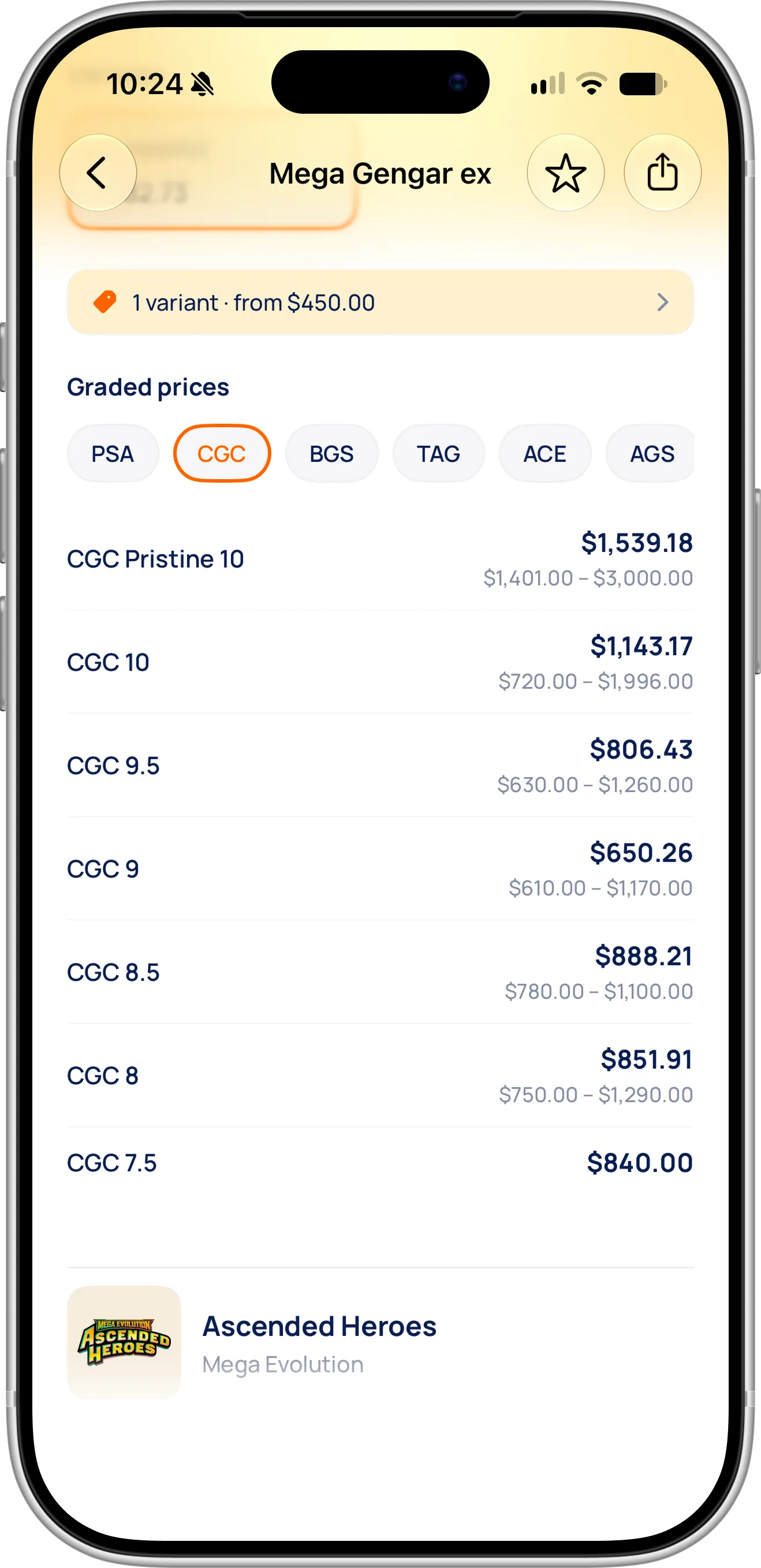
Tap a company to see its grades. The large number is the market price, and the smaller range below shows the lowest and highest recorded prices.
The large number in each row is the average recorded price at that grade, and the range below it runs from the lowest recorded price to the highest. A wide range means buyers have paid very different amounts, so the average alone can mislead you. When a row has no range, as with CGC 7.5 in the screenshot, the prices recorded at that grade were all the same, which usually means very few sales.
The companies you see depend on the card, because EvoScan lists the ones with recorded prices. On cards with more history, you can also find companies such as SGC. Graded prices cover both English cards and Japanese Pokémon cards.
What Is a PSA Population Report?
A PSA population report is a count of every copy of a card that PSA has graded, split by grade. It’s often shortened to “PSA pop”. When collectors say a card has a “low pop”, they mean few graded copies exist, at least at the grades that matter to buyers.
In EvoScan, select PSA under Graded prices and you’ll find PSA Population below the prices, with the total number of graded copies and a chart. Each bar is one grade, with the number of copies above it and that grade’s share of the total inside it.
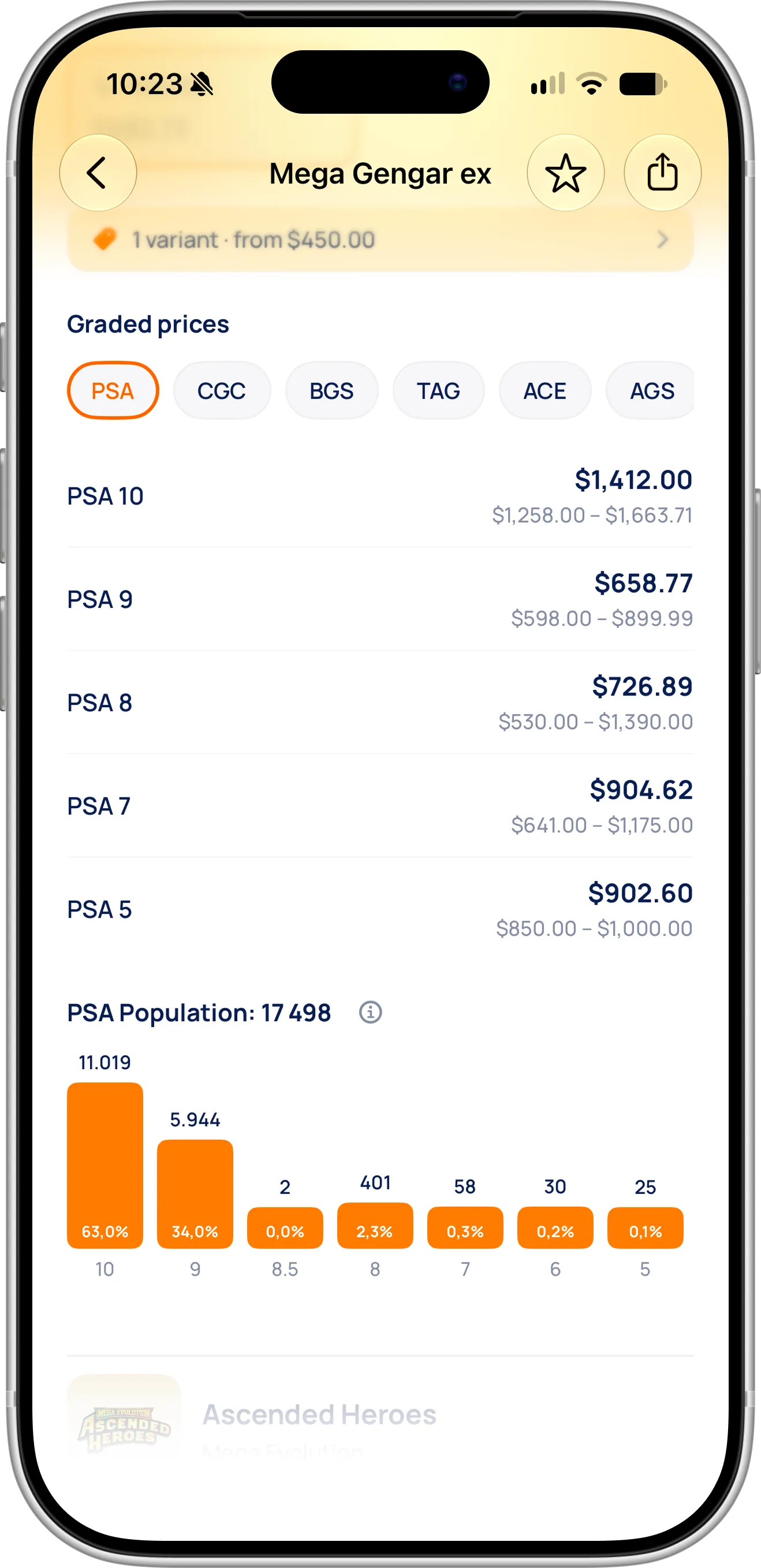
Select PSA to see its prices and its population together: here, 63% of all graded copies of this Mega Gengar ex are PSA 10.
The population report also shows grades that have no price row. In this screenshot, 30 copies are PSA 6, but there’s no PSA 6 price, because no prices are recorded at that grade. Swipe the chart sideways to see every grade. The bars on screen here cover all but 19 of the copies, and those are PSA 4, PSA 3 and qualified grades.
Population reports currently come from PSA only. They cover English cards and some Japanese cards, so a card without one simply doesn’t show the section.
Why a PSA 10 Isn’t Always Rare
Comparing price with population shows you why the same grade can mean very different things. Here are a modern card and a vintage card, with values from EvoScan in early November 2026:
| Mega Gengar ex 284/217 (Ascended Heroes) | Charizard 4/102 (Base Set, Unlimited Holofoil) | |
|---|---|---|
| Copies graded by PSA | 17,498 | 107,063 |
| PSA 10 copies | 11,019 | 489 |
| Share that are PSA 10 | 63.0% | About 0.5% |
| Raw Near Mint market price | $682.73 | $987.13 |
| PSA 9 market price | $658.77 | $3,339.80 |
| PSA 10 market price | $1,412.00 | $35,401.12 |
Base Set Charizard has more than six times as many graded copies, but far fewer PSA 10s, because a card from 1999 rarely survives in perfect condition. A PSA 10 sells for about 11 times a PSA 9. On the modern Mega Gengar ex, PSA 10 is the most common grade, and it sells for about twice a PSA 9.
The table also shows why a higher grade isn’t automatically worth more than a raw card. The PSA 9 of this Mega Gengar ex was selling for less than a raw Near Mint copy. These prices are examples: graded prices come from our card data provider, raw prices come from TCGplayer, and both change with the market.
Tips for Reading Graded Prices and PSA Population
Compare companies, not just grades. The same number doesn’t mean the same price: in the screenshots above, PSA 10 is at $1,412.00 and CGC 10 at $1,143.17 for the same card. Check the tab for the company on the slab before you assume what it’s worth.
Be careful with prices at grades that rarely sell. On this Mega Gengar ex, PSA 7 shows a higher price than PSA 9, but PSA has graded only 58 copies at 7 against 5,944 at 9. A price that breaks the usual order is more likely to come from a handful of sales than from real demand for a lower grade. The wider the range and the smaller the population, the less you should rely on the average.
Before you submit a card for grading, compare the prices with the population. If most graded copies reach a 10, you may well be competing with thousands of identical slabs. If a 9 sells for less than a raw copy, as it does here, grading is a bet on reaching a 10, and you still have to pay for the grading. Start from an honest look at your card’s condition, and see how to check your Pokémon card’s value for what else moves a price.
Remember what the population doesn’t tell you. It counts graded copies, not printed ones, so many more ungraded copies can exist. Collectors also tend to submit their best and most valuable cards, so a high share of 10s doesn’t mean that any copy from a pack will get one. And the numbers keep changing as more cards are graded, so check them again before a big purchase or sale.
Check the variant too. A 1st Edition and an Unlimited copy of a card are different cards to buyers, so they have separate graded prices and population. When you select a variant on the card page, both change to match it.
Need Help or Have Feedback?
If a graded price looks wrong, a report seems out of date, or you have ideas for tracking graded cards, you can always reach out through the contact page. Your feedback helps improve the Pokémon card scanner for every collector.